Your menu is already a PDF, and you want guests to open it by scanning a code on the table. There are two ways to do it: point a QR code at the PDF itself, or turn the PDF into a menu page made for phones and point the QR code there.
Both can be free. Here is how each works, and how they compare on a guest’s phone.
Option 1: a QR code that opens your PDF
Step 1: Put the PDF online
Upload it somewhere with a public link: Google Drive (Share → “Anyone with the link”), Dropbox, OneDrive or your own website. Open the link in a private browser window to make sure it works without signing in.
Step 2: Make the QR code
Paste the link into a QR code generator and download the code, preferably as SVG for printing. Avoid generators whose free codes are “dynamic” trials: they can stop working when the trial ends.
Step 3: Test it before printing
Scan it with an iPhone and an Android phone, on mobile data rather than your Wi-Fi. Watch what happens: does the PDF open, or does the phone download it or ask for an app?
Keep the link the same
The QR code holds the link, not the file. If you upload a new version of the PDF and the link changes, every printed code still opens the old menu. Replace the file in place (Google Drive: “Manage versions”) so the link stays the same.
What goes wrong when guests open a PDF on a phone
A PDF is a printed page in digital form. That is exactly its problem on a phone:
- Pinch and zoom. An A4 page shrunk to a phone screen is unreadable until the guest zooms in, and then they scroll sideways along every line.
- Waiting. A designed menu with photos is often several megabytes. On a terrace with weak signal, the guest stares at a blank screen.
- Downloads and viewers. Depending on the phone and where the file is stored, the PDF opens in a viewer, in a cloud app, or lands in the downloads folder.
- Every change is a new file. A new price means editing the PDF, exporting it and uploading it again without breaking the link.
- One language. Each translation is another PDF and, usually, another QR code.
- Harder to read for some guests. Screen readers and the phone’s own text-size setting work far better on a web page than on most PDFs.
Option 2: turn the same PDF into a mobile menu
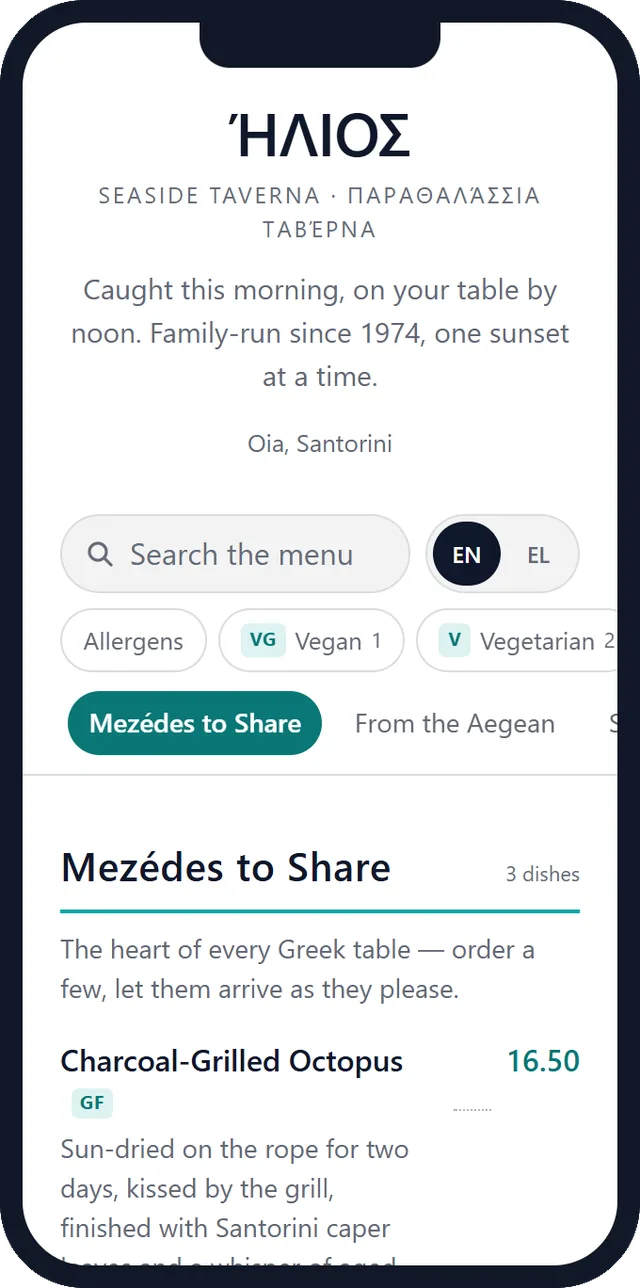
Instead of showing the PDF, you can turn its content into a menu page that fits the phone screen. With MenuQR the PDF does the typing for you:
Step 1: Upload the PDF
Up to 30 pages and 10 MB. A PDF exported from a design tool, a scan, or photos combined into one PDF all work.
Step 2: Let the AI read it
It sorts the menu into sections and dishes, with descriptions and prices, in the language the menu is written in.
Step 3: Check, then publish
Read through the result, prices first, and fix anything in the editor. Publish, and the menu gets its own address.
Step 4: Download the QR code
As PNG or SVG. When prices change later, edit and publish again: the address stays the same, so the printed code keeps working.
PDF link or mobile menu: side by side
| What you compare | QR code to a PDF | QR code to a MenuQR menu |
|---|---|---|
| Reading on a phone | Pinch, zoom and scroll sideways | Text sized for the screen, with search, sections and diet filters |
| Opening | Downloads the whole file; may open in another app | Opens as a web page in the browser |
| Changing a price | Edit, export and re-upload the PDF without changing the link | Edit the dish and publish; same address |
| Languages | One PDF per language | Up to 3 languages in one menu (Pro) |
| Your design | Exactly as you made it | A design made for phones; your colours, fonts and logo on Pro |
| Cost | Free | Free for one menu up to 30 dishes; Pro €9/month |
Which one should you choose?
A PDF link is enough if your menu is a single short page, rarely changes, and you need something on the tables today.
A mobile menu is worth it if your menu runs to several pages, prices change during the season, many guests are tourists, or you simply want guests to read it without zooming. Turning the PDF into one costs you a read-through, not an afternoon of typing.
MenuQR’s free plan covers one menu with up to 30 dishes. Pro is €9 a month or €89 a year with a 14-day free trial; see pricing. For the whole process, from a printed menu to QR codes on the tables, read how to make a QR code menu for free.