A QR code menu has two parts: your menu on a web page, and a QR code that opens that page. Guests scan the code with their phone camera and read the menu in their browser. No app, no download.
You can set one up for free with the menu you already have, whether it is printed, a photo or a PDF. This guide walks through the options, the steps with MenuQR, and the things to check before you print.
Three ways to put your menu online
The QR code is the easy part. The real choice is what it opens.
1. A PDF of your menu
Upload a PDF to Google Drive, Dropbox or your website and make a QR code for the link. It costs nothing and takes a few minutes. The catch is the guest’s side: a PDF is laid out for paper, so on a phone it means pinching, zooming and waiting for the file to load. Our PDF menu guide covers this route in detail.
2. A page you build yourself
A website builder or a design tool lets you lay out every dish yourself. You get full control, but you type every name, description and price, and type them again whenever they change.
3. A menu app that reads the menu you already have
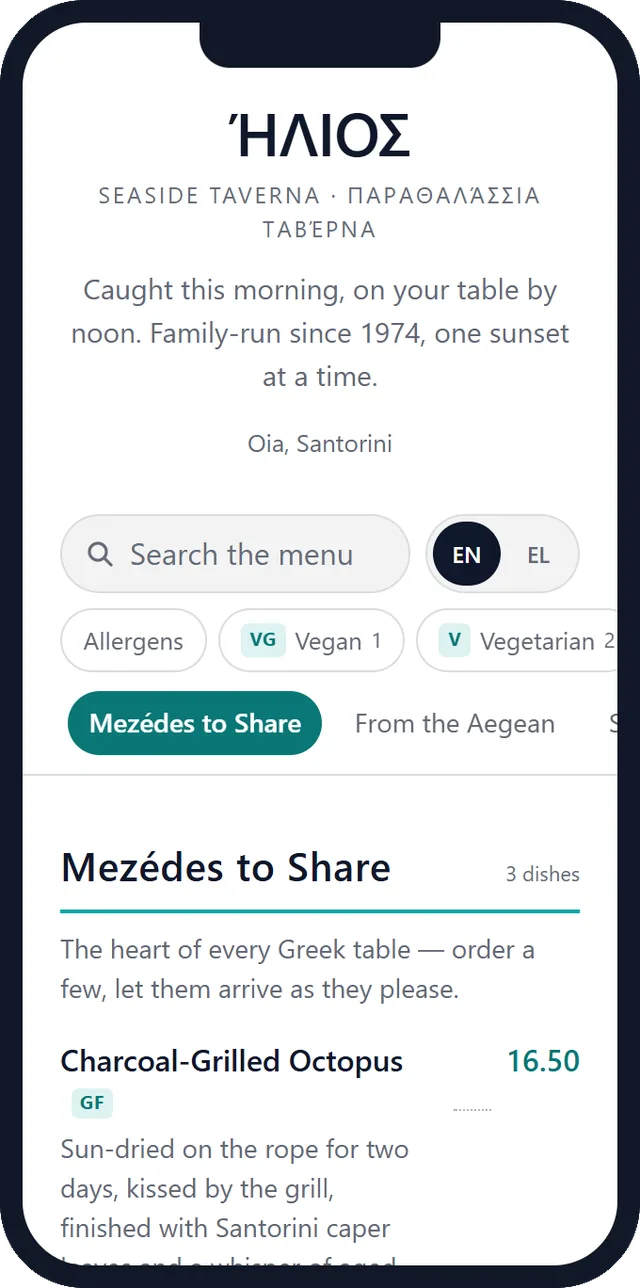
Some apps, MenuQR among them, read your printed menu or PDF with AI and turn it into a mobile menu page. You check the result instead of typing it. This is the route the rest of this guide follows.
Step by step: a QR code menu with MenuQR
Step 1: Photograph your menu, or find the PDF
Lay the menu flat in daylight, fill the frame with one page and avoid glare from lamination. If the menu has several pages, scan them into a single PDF with your phone: Notes or Files on an iPhone, Google Drive on Android, both have a “Scan” button.
Step 2: Upload it
Upload one file: a PDF of up to 30 pages, or a photo (JPG, PNG or WEBP), up to 10 MB. Start here; the free plan needs no credit card.
Step 3: Check what the AI read
The AI sorts your menu into sections and dishes, with descriptions and prices, in the language it is written in. Read it through once, prices first, and fix anything in the editor. Handwritten or faded menus need the closest look.
Step 4: Choose the look
The free plan uses a clean, ready-made design. Pro adds your own colours, fonts and logo, or an AI brand kit that picks them from your menu.
Step 5: Publish
Your menu gets its own address and opens in any phone browser. It is a light page built for small screens, and it sets no cookies on your guests’ phones.
Step 6: Download the QR code and test it
Download the QR code as PNG or SVG. Before you print a stack of table cards, scan it with two different phones, ideally an iPhone and an Android, on mobile data rather than your Wi-Fi.
When prices change
Edit the dish and press Publish. The address of your menu does not change, so the QR codes already on your tables show the new prices straight away. Nothing to reprint.
Printing your menu QR code
- Size: on a table card, about 3 × 3 cm is the practical minimum. On a window or a poster read from a few metres away, go much larger.
- Contrast: dark code on a light background. Light codes on dark backgrounds fail on some phones.
- Margin: leave a blank border around the code, at least the width of one of its corner squares. Text or a frame pressed against it makes it harder to scan.
- A line of text: “Scan for the menu” under the code tells guests what they will get.
- Where: one code on every table, and one at the entrance or in the window so people can read the menu before they sit down.
What does a QR code menu cost?
The QR code itself is free: it is only a picture of a web address. What can cost money is the menu page it opens, and printing.
- PDF route: free, apart from printing.
- MenuQR free plan: one menu with up to 30 dishes, 3 menu uploads read by AI a month, and a plain QR code. Free for as long as you use it.
- MenuQR Pro: €9 a month or €89 a year, VAT included in the EU, with a 14-day free trial. Unlimited menus and dishes, up to 3 languages per menu, allergens and calories filled in by AI, your own design and logo. See pricing.
Before you print: three things to check
Codes that stop working
Some free QR generators make “dynamic” codes that pass through their own servers. When the trial ends, the code can stop opening your menu, and you find out from your guests. Check what happens after the trial before you print. The QR code on MenuQR’s free plan opens your menu’s own address and has no trial attached.
Allergen information
In the EU, guests must be able to get allergen information for the dishes you serve. A digital menu can show allergen tags next to each dish, but check what your country asks for and keep the details correct.
Guests who prefer paper
Not everyone has a phone at hand or finds small screens easy. Keep a few printed menus for guests who ask.